
log_file
To access the log file for MERLIN-Expo, follow these steps:
1. Open Windows explorer (the file manager).
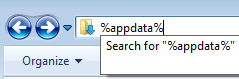
2. In the address field, write %appdata% and press ENTER
 3. Go into the 4FUN folder, then into the log folder.
4. The log file is named log.txt
3. Go into the 4FUN folder, then into the log folder.
4. The log file is named log.txt
See also
log_file.txt · Last modified: by 127.0.0.1